Five agents running. One of them is waiting on you.
AgentOrbit puts every AI agent you run, on your Mac and on your Linux servers, into one bar and one Inbox. It
tells you which one is stuck on a question, and lets you answer from your Mac or your phone.
Free, and it runs on your own machines. macOS 14 or later, Apple silicon.
Works with Claude Code, Codex, OpenCode,
Pi, Gemini and Grok, running in
herdr.
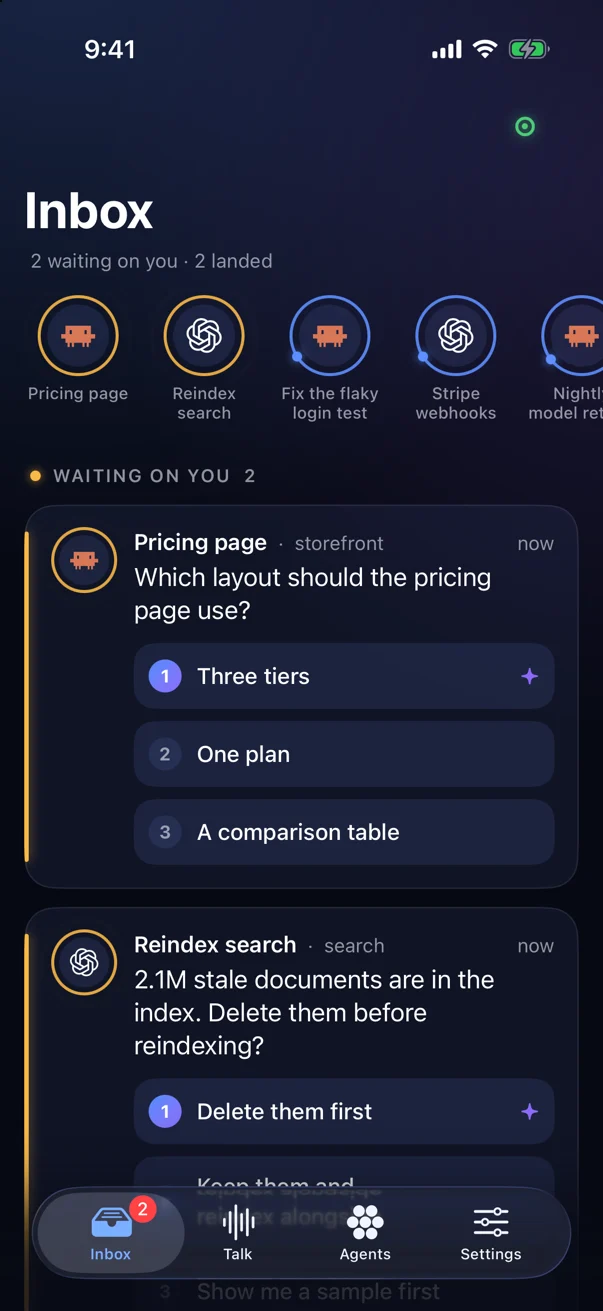
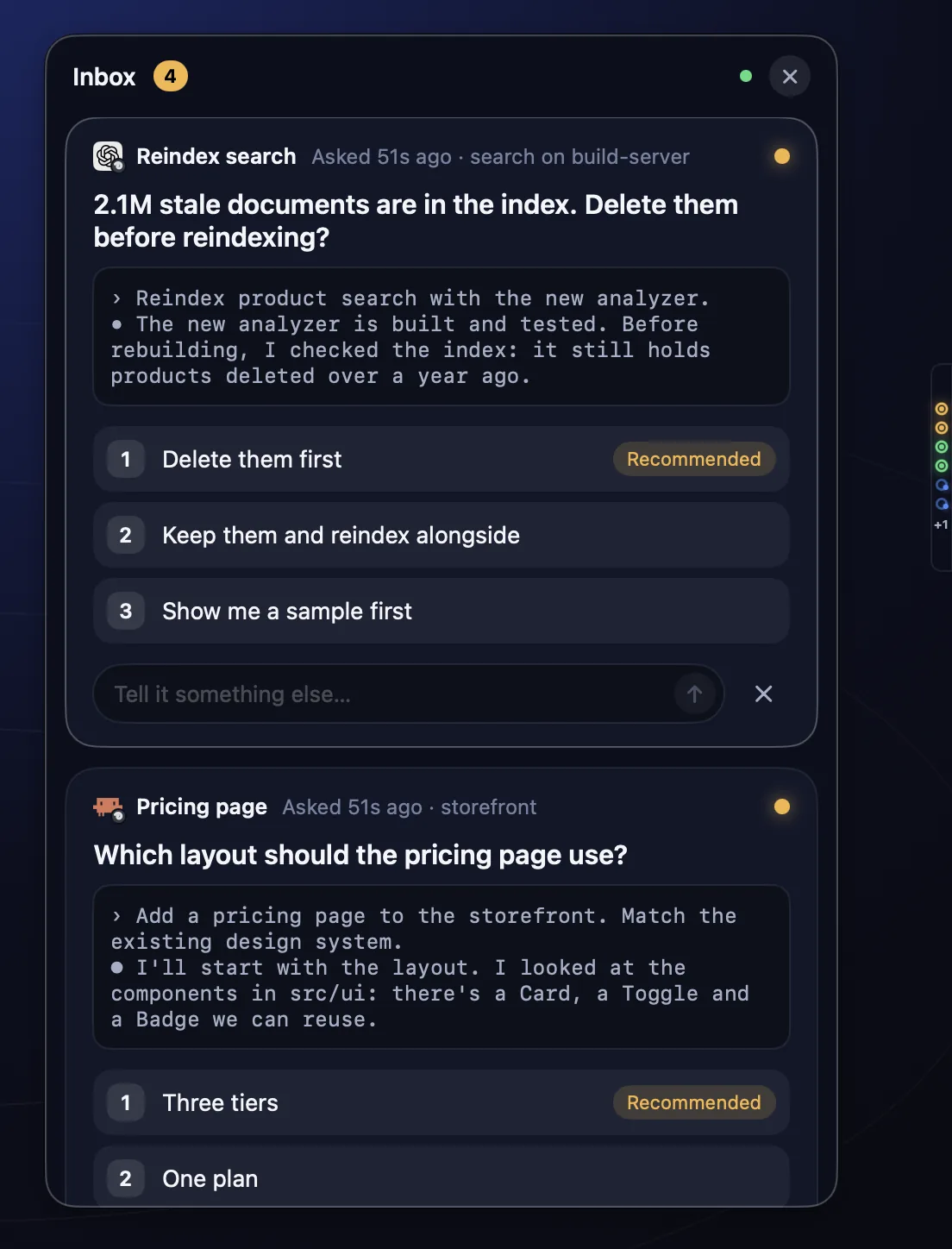
The Inbox, with two questions waiting. One keystroke and the first agent is back at work.
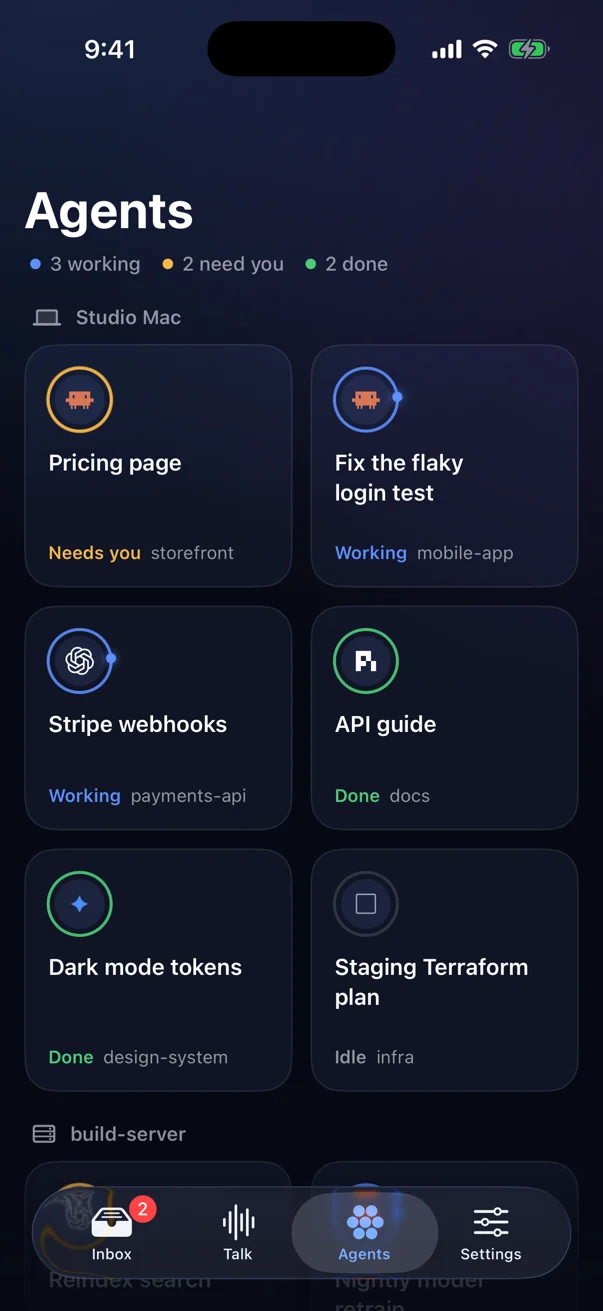
The bar and its agents list: eight agents on two machines.
One dot per agent.
A slim bar sits on the edge of your screen. You stop cycling through terminal tabs to check who is doing what,
because the dots already say.
Blue is working.
Amber has a question for you.
Green is done.
Hover a dot to peek at that agent's last few messages and the subagents it has running. Click the bar for the
full list, grouped by machine and project.
Answer with a number.
Every question and every finished job lands in one list. ⌥⌘I
opens it from any app. Most questions come with options, so most answers are one key.
1 to 9
pick an answer, or send a suggested next step
R
reply in your own words
JK
move between cards
E
clear a card you have read
Esc
take it back. Every answer waits two seconds before it is sent.
Two questions answered, one key each.
Talk works out that “the docs agent” means pi-1.
Or just say what you need.
Double-tap ⌥ and say it or type it: ask the docs agent to add a section on rate
limits. Talk sends it to the right agent, or starts a new one in the right project, and tells you when it
is done.
Drag over part of your screen while you talk and the screenshot goes along with the request.
Talk runs on your own Anthropic or OpenAI API key. With no key it falls back to plain rules: name the agent or
the project and the request goes there. How Talk picks an engine
Agents on a server join with one line.
Run this on any Linux box your agents live on, x86_64 or arm64. It installs a small connector, asks for the
pairing code from your Mac, and that machine's agents show up in the same bar and the same Inbox.
curl -fsSL https://dl.agentorbit.app/install.sh | sh
The connector opens no ports. It dials out to your relay and nothing else.
The agent that needs you does not care that you went for coffee.
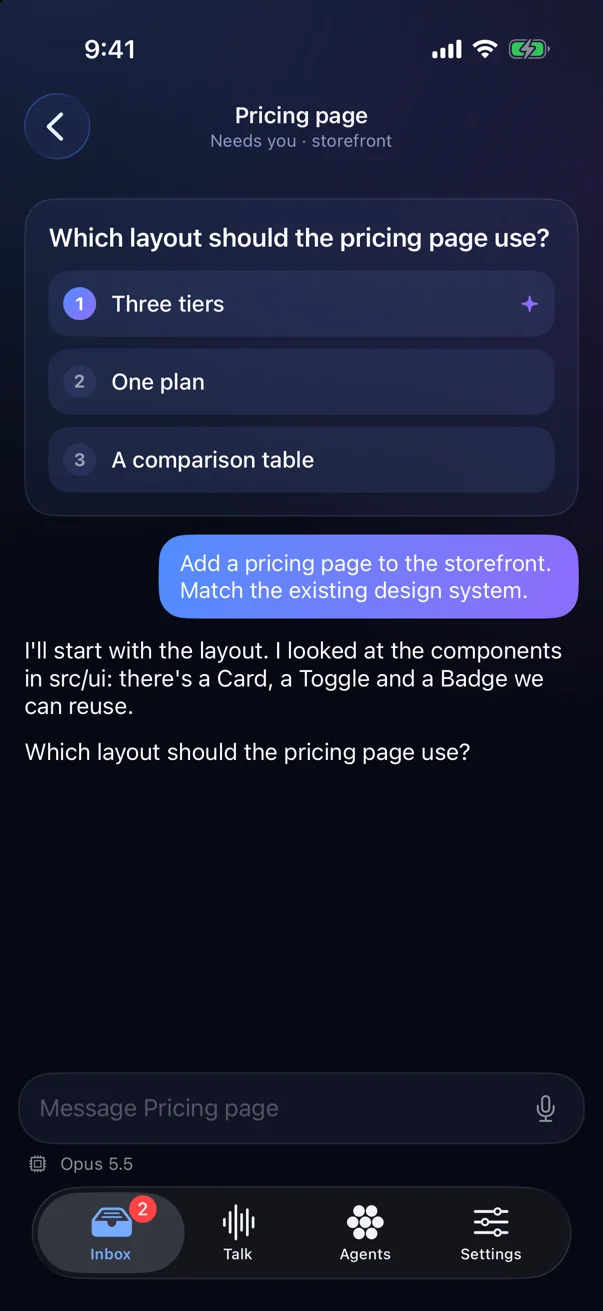
So the same Inbox is on your phone. A question arrives as a notification, you tap an answer, the agent carries
on. Notifications are sealed on the machine the agent runs on and opened on the phone itself; turn on Time
Sensitive alerts and a question gets through Focus.
iOS 17 or later; on your Home Screen it is simply called Orbit. The phone connects to your Mac at home on
your network, or anywhere with Tailscale or a relay on your own server. On Android, or an iPhone without the app,
AgentOrbit runs in the browser, with the same encrypted notifications.
The Inbox. What is waiting on you comes first.
Tap an answer, or reply in your own words.
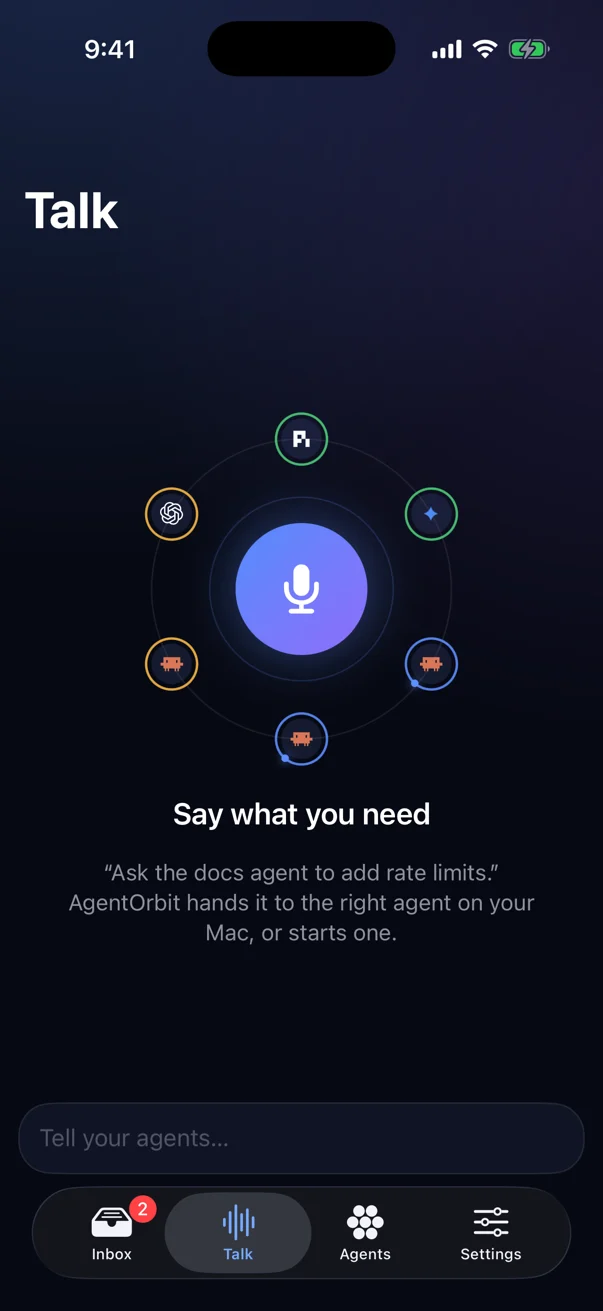
Talk: say what you need from anywhere.
Every agent, on every machine.
All of it, in one minute.
The bar fills up: agents on the Mac and on build-server, a dot each.
Two of them ask something. The Inbox opens and each gets its answer with one key.
A request is spoken to Talk, which finds the right agent and passes it on.
An agent finishes. A small mascot pops out with the shortcut to reply.
No sound. The projects and agents are a demo set, the app is the real one.
Smaller things you would miss.
Two seconds to change your mind
An answer waits two seconds before it is sent. Esc, and it never happened. That is what makes one-key answers safe.
Suggested next steps
When an agent finishes, AgentOrbit offers up to two replies. Send one with a single key, or write your own.
Notes
Tell AgentOrbit how you like things done. Talk reads your notes before it sends anything to an agent.
Usage
How much of your Claude and Codex plan is left, for the session and the week, and when each limit resets.
Tool updates
Settings shows which versions of Claude Code, Codex, Pi and herdr you have, and updates them in place.
Sounds
One sound when an agent needs you, another when it finishes. Pick from the Mac's built-in set, or turn them off.
Eleven themes. One of them is probably already your terminal's.
The bar, the Inbox, Talk and peeks all follow. The iPhone app has light and dark.
The Inbox in Orbit Night.
It runs on your machines. We could not read it if we tried.
There is no account, and no server of ours between your devices. Your Mac is the hub: a small relay built into
the app passes messages between your Mac, your phone and your servers, and every message is sealed with a key
that only those devices hold.
Your iPhone connects to the Mac directly: at home over your own network, and from anywhere else through
Tailscale, which is free. The Mac has to be awake. For always-on access, run the same relay on a server of
your own; it is one binary, and it only ever forwards envelopes it cannot open.
One thing does pass through us: iPhone notifications, because only we can hand a push to Apple for the app. A
notification leaves your machine already sealed and is opened on your phone. Our push service delivers it
without being able to read it, and carries nothing else.
A Mac app, an iPhone app, a browser app and a small Linux connector for people who run AI agents such as Claude Code, Codex, OpenCode, Pi, Gemini and Grok. It shows every agent's state in a slim bar, collects their questions and finished work in one Inbox, and lets you answer with a keystroke, your voice or your phone. Everything between your devices is end-to-end encrypted.
What does it cost?
Nothing. AgentOrbit is free: the Mac app, the iPhone app, the browser app and the Linux connector, with no plans and no account. It's maintained as-is while we see where agent tooling goes; paid features may come later, and what's free now stays free. If it saves you time, you can chip in, which is optional and unlocks nothing.
Where does it run?
On your own machines. The Mac app has a small relay built in that passes sealed messages between your Mac, your phone and your servers; choose Just this Mac at setup. Your iPhone connects to the Mac at home on your network, or from anywhere with Tailscale. If you'd rather the relay lived on a server, so your phone can reach agents there while the Mac sleeps, run it yourself and choose My relay. The self-hosting guide covers it. The only thing that passes through our servers is a sealed iPhone notification.
What do I need?
A Mac with Apple silicon running macOS 14 or later, and herdr, a free terminal workspace for agents (the Mac app installs it for you if it's missing). For the phone, an iPhone on iOS 17 or later. For servers, Linux on x86_64 or arm64; the server installer sets up herdr as well.
Do I need herdr?
Yes. herdr is how AgentOrbit sees your agents and types your replies into them, so run your agents inside herdr. It's free, and AgentOrbit installs it for you on the Mac and on Linux servers. AgentOrbit can also show agents running in the Claude or Codex apps, but answering them from your Inbox or phone works best in herdr.
Does it work when my Mac is asleep?
It depends on where your relay runs. With Just this Mac, the Mac is the relay, so it has to be awake for your phone to connect. With a relay on your own server, your phone keeps working and can still reach agents on your servers. Agents running on a sleeping Mac can't do anything until it wakes, though; AgentOrbit can't change that.
How does my phone reach my Mac when I'm out?
With Just this Mac, your phone connects straight to your Mac: at home over your own network, and away from home through Tailscale, which is free for personal use. When Tailscale is installed, the Mac app shares its relay on your tailnet by itself. Without Tailscale or a server of your own, the phone only reaches the Mac at home. For always-on access, run the relay on a server and choose My relay. Either way, notifications arrive end-to-end encrypted through our push service; it delivers them, it does not carry the connection.
How do I get the iPhone app?
It's in public beta on TestFlight: join the beta, then scan the pairing code your Mac shows. It has the Inbox, Talk, the Agents list and full conversations, and on your Home Screen it's simply called Orbit. An App Store release follows the beta.
Can I use it on Android, or without the iPhone app?
Yes. AgentOrbit runs in your phone's browser on Android and iPhone (iOS 16.4+), and in desktop browsers: add it to your Home Screen, pair it with a QR code from your Mac and turn on notifications. They are end-to-end encrypted, like the app's. How to set it up.
Does it work with agents on a server?
Yes. One command installs the connector on a Linux server (x86_64 or arm64). Its agents join the same Inbox and bar as the ones on your Mac. The connector opens no ports; it only dials out to your relay.
What can the relay see?
Only ciphertext, device ids, timing and sizes. Messages are sealed with a key that lives on your devices, and the relay never has it. And the relay is yours: it runs on your Mac or your server. See the security page for the full model.
Does Talk need an API key?
To use a model for Talk and recaps, yes: add an Anthropic or OpenAI API key in Settings → Talk and recaps, and that provider bills those calls to you per use. Anthropic's terms don't allow other apps to use your Claude Pro or Max subscription, so AgentOrbit doesn't. With no key at all, Talk runs on simple rules on your Mac. Your agents keep running on your own Claude or Codex plan as usual. More about Talk engines.